Bring Los Santos to Life on Your Desktop
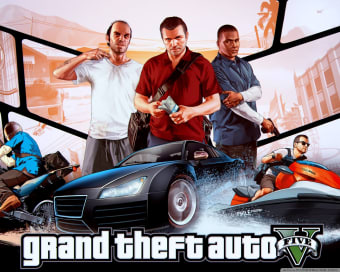
The Grand Theft Auto 5 Theme, developed by Electrocomputerscience, is a free desktop personalization pack designed for fans of the iconic Rockstar title. Featuring more than 40 high-definition wallpapers inspired by Grand Theft Auto V, it lets users transform their desktop background with scenes from Los Santos and its most recognizable characters—Michael, Franklin, and Trevor. Installation is straightforward, and the theme applies automatically without requiring any manual setup.
Top Recommended Alternative

A Visual Experience That Delivers
This theme focuses purely on wallpaper customization, cycling through a large collection of images that showcase GTA V’s cinematic visuals. Once installed, users can enjoy a slideshow of landscapes, action sequences, and character portraits, refreshed at set intervals. The wallpapers retain strong color balance and clarity, giving the desktop a polished, high-energy look that reflects the game’s atmosphere. Because it is a simple themepack, there are no extra effects or icons added—just a clean, rotating gallery of game art.
Limitations to Consider
While the theme succeeds visually, its functionality remains basic. It lacks sound effects, screensavers, or desktop icon changes, and users cannot choose a fixed single wallpaper within the automatic rotation. Themed color accents are minimal, and customization beyond background cycling is not supported. Compatibility may also vary on newer systems such as Windows 10 and 11, where older themepack formats may not apply correctly without manual adjustments. As with all third-party themes, downloading from a trusted source is recommended to ensure safety.
A Simple but Stylish Tribute for Fans
In summary, the Grand Theft Auto 5 Theme offers a quick and visually rich way to personalize your desktop with imagery from the world of Los Santos. Though limited to wallpaper rotation and lacking broader customization, its crisp visuals and effortless setup make it a solid choice for fans seeking a small, aesthetic reminder of GTA V.







.png)